
The right proposal business template can win you more clients and close more deals.




A great business proposal is a sure way to win more clients and close more deals. Luckily, you don’t have to spend hours getting your business proposal to look right. You can use the right business proposal template.

Using a proposal business template for Microsoft Word or InDesign helps you save time. It’s already got all the necessary pages and elements in place. All you’ve got to do is add your information and customize the fonts and the colors.
If you’re short on cash, you can use a free proposal template Word available online. Spend a bit more to get premium professional business proposal templates on Envato Elements.
15 Premium Word & InDesign Business Proposal Templates From Envato Elements
Here, you’ll find examples of our best premium business proposal templates. Get them all from Envato Elements:

Click on the image to see more of this premium business Proposal Template.
This proposal business template is a clean and professional template. Easily customize it to fit your needs. Choose between four different color schemes.
This business proposal template comes with a free font. It also comes in two different sizes A4 and US letter size. This template is an InDesign template. Check out more of its features:
- INDD and IDML files
- 2 sizes: A4 & US Letter
- CMYK color mode
- 4 color variations
- free fonts
- help guide

This template for a proposal for business plans was created in InDesign. There are 12 unique pages that come with this template.
Easily edit the template to create the proposal you need. The design is of high quality and easy to print. Add your images, fonts, and pages to make the proposal suit your needs. Here are some of the highlights of this business proposal template:
- EPS, INDD, IDML, JPG, and PDF files
- 12 custom pages
- A4 size
- CMYK
- easy to edit
- ready to print
- organized layers
- free font

Here’s the Proposal business template. It features a modern and clean design and comes with 24 pages in total. It’s perfect for sharing information about your company, project details, and next steps. The template was designed with InDesign. Download this template for proposal for business plans and get:
- InDesign files
- 24 pages
- sizes: A4 and US Letter with 3mm bleed
- design in 300 DPI resolution
- Roboto font
- PDF help file

This brochure template cover for proposals has a clean and simple design. It can be edited in InDesign and Word. The template has many editable shapes and project timeline options. It was designed with the highest-quality proposal aesthetic in mind. On top of that, it includes:
- InDesign and MS Word files
- 24 pages
- A4 and US Letter + bleeds
- 300 DPI
- Master pages
- print-ready
- based on 12 column grid
- free fonts
- help file
Download this template proposal for business plans and save time and money on your projects. It will give you much more than you could ask for from a template proposal gratis for Word or InDesign.

This business proposal template for Word is a great choice for creative businesses. Edit it in InDesign as well as Word. The template comes with:
- .indd, .idml, .docx, .doc, and .pages files
- 32 pages
- A4 and US Letter sizes with 3mm bleedings
- CMYK at 300 DPI
- print-ready
- free fonts
- PDF for previews
- PDF documentation file
As you can see, you’ll have everything you could need. That’s not something you could say of most free template proposals for Word or InDesign.

Use this premium company proposal business template with InDesign. It’s a high-quality and modern professional template cover for proposals that will stir your projects and your efforts in the right direction. If you’re wondering how it can make your life easier, just take a peek at its best features:
- INDD and IDML files
- 12 pages
- A4 size
- CMYK color
- 300 DPI print-ready
- 3 mm bleed
- free font

This is a multipurpose proposal template for different proposal situations. In any case, you can be absolutely sure that it will help you achieve the goals you’ve set up for your company, business, project, or personal venture. Not to mention, it takes good care of the proposal aesthetic. Have a look at its highlights:
- INDD and IDML files
- 14 pages
- A4 and US Letter sizing
- print-ready
- stylish layout and design
- well-organized
- free fonts

This business proposal template is perfect for any type of project you have in mind. Download it and unlock unlimited possibilities to give your proposal the perfect boost. You can make it your own and explore the features it comes with:
- INDD and IDML files
- US Letter size
- CMYK @ 300 DPI
- Master pages
- grid layout
- automatic page numbering
- free fonts
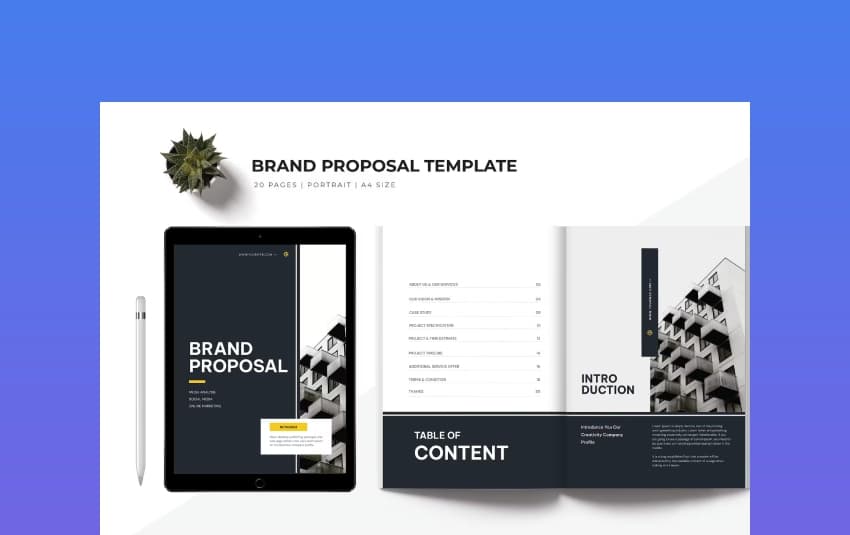
You can never go wrong with a black, light, and grey design with a hint of color. While it has a straightforward and classic layout, it still holds interesting elements that make it stand out. If that weren’t enough, its features take this template for proposals for business plans to another level:
- IDML, INDD, and DOCX files
- 20 pages
- A4 dimensions
- print-ready
- Master pages
- automatic page numbering
- free fonts
- help file

A bold template is what you need if you’re looking to make a bold proposal. If that’s your intention, go for this option. It’s creative, fun, and just a bit loud, which is sure to get everyone’s attention. Learn more about its features here:
- InDesign and Word files
- 20 pages
- A4 Letter size
- print-ready
- aligned to a column and grid
- free fonts
- help file
Download this template for proposals for business plans and forget all about any free templates for proposals in Word and InDesign.

Take minimalism to an aesthetically pleasing extreme with this template. The design is clean and modern, and it will bring down all the noise that could be distracting from your content. If the proposal’s design is not enough to convince you, its features sure will:
- INDD and IDML files
- 40 pages
- A4 and US Letter sizing + 3 mm bleeding
- CMYK @ 300 DPI
- print-ready
- preview PDFs
- documentation PDF

This template proposal has a design to instantly stand out. The template proposal has a professional design, and it shows. Moreover, the features in this business proposal template will help you appeal to your audience more easily:
- InDesign files
- 24 pages
- 2 sizes: A4 and US Letter
- Master Pages
- free fonts
- help file
Download this template proposal for business plans and elevate your pitch!

Make a statement with this modern proposal business template. The premium template proposal comes with a professional design that’s eye-catching and well-thought-out. Its list of features will let you know why this is better than a business proposal free download:
- 4 INDD and IDML files
- 28 pages
- A4 and US Letter sizes
- print-ready
- fully editable
- preview PDF files
- free fonts: Aleo, Montserrat, Roboto, Windsong
- read me file

This clean business proposal template is perfect if you. You can match it to your business or project and create a proposal that will keep your audience interested and engaged. The color use, shapes, and elements give it a smart touch that will allow your content to shine through. Plus, it has fantastic features:
- INDD and IDML files
- 12 pages
- A4 size with 3 mm bleed
- CMYK color
- 300 DPI
- print-ready
- free font
It will be much more cost-effective than any free proposal template you could find on the web.

If you prefer minimalist designs, this premium template proposal is for you. This Proposal Template features a clean design with plenty of white space. You won’t find this design quality in a creative proposal template for free. With this download, you’ll get:
- INDD, IDML and INX files template
- 16 document pages
- A4 and US Letter sizes + bleeding
- CMYK 300 DPI
- fully editable
- free fonts and icons
- help file
Don’t go for a free download business proposal template if you want to make the best impression. Use a premium template like this instead.
Get the Best Premium Business Proposal Templates on Envato Elements (With Unlimited Use)
Are you set with free templates for proposals for Word and InDesign? You’ve also seen some of the best premium business proposal templates available. As you can notice, premium proposal templates offer you an advantage over templates for proposals that are gratis.
Envato Elements has thousands of business proposal templates for Word and InDesign with professional designs.

Enjoy unlimited premium proposal template downloads with a subscription to Envato Elements.
You may be tempted by free download business proposal templates you find online. Keep in mind that these templates often have limitations. You get what you pay for.
Envato Elements is a subscription-based marketplace. It offers design assets such as icons, proposal templates for Word and InDesign, and more.
For one low monthly fee, download as many items as you want. It’s a great choice if you need design assets on an ongoing basis.
20 Best Free Business Proposal Templates (InDesign & Word Formats) in 2023
If you’re on a budget, there are plenty of template proposal free downloads online. Looking for a business proposal template free download on the web?
First, check out Envato’s freebies first. There are various premium template files for free (not always business proposal templates).

Each month Envato Elements offers a different selection of free files for you.
Here’s the deal:
- Every month Envato Elements offers 12 different hand-selected files, (fonts, presentations, videos, and more). Create a free account to download this month’s free premium files now.
Looking for a creative template proposal free? We’ve rounded up the 20 best proposal template free downloads. Find a list of business proposal template free download. Enjoy this selection of free business proposal templates:

The first on this list is a one-page free template for proposals in Word. Looking for a business proposal template doc free download? This one could be a great fit. It’s a great business proposal template free download for Word. Also use this as a business proposal sample doc.
Looking for a versatile business proposal Word template for free? Here’s another free proposal template for Word from the list. This versatile free business proposal template Word doc free download is a good choice. This Word proposal template has a multipurpose design. Edit this template cover proposal in Microsoft Word.
This is a free business proposal template for Word that’s got everything you need. Edit the template in Microsoft Word. You’ll find sections for deliverables, objectives, a timeline, and project costs. This business proposal Word template has your back. This template proposal for Word is gratis and worth a look.

Try this creative proposal template free file if you’re looking for a modern design. The business proposal template Word free download includes the necessary sections. Present your services, project details, a budget estimate, and important info.
Check out this business proposal template free download. The free Word Business Plan template features a simple design. This free proposal template for Word comes with several custom pages. Fill in this free template proposal business plan with the details of your business.
This elegant business proposal template is completely free to download, change, and use. The business proposal template doc free download comes with 44 pages. It’s designed as an InDesign proposal template free download.
This business proposal template free file features a clean layout. Start working with this business proposal template Word free download. It comes with a background image in the template cover proposal.

Use this creative proposal template free for any project. The free download business proposal template includes custom pages. Also features a colorful design. Edit this template in Adobe InDesign. Customize the design with your brand’s identity elements.
The free Proposal template for InDesign features a bold, modern design. It’s a good choice for any type of corporate proposal. The business proposal template doc free download includes 20 pages. It comes in InDesign format. Free for personal and commercial use.
This Business Proposal template is another good choice for any type of corporate project. The template is fully editable in InDesign and includes 20 page designs. You’ll also find character and paragraph styles as well as predefined color schemes. Download this template for proposals gratis and start using it right away.

This free bi-fold business proposal template has a minimal design and layout. The business proposal template Word free download is easy to customize. This proposal template free download is worth a look.
Consider this free business proposal template if you want a modern and elegant proposal. The template includes free images and fonts as well as 20 custom pages. All the shapes, colors, and fonts are editable with InDesign.
Here’s another great free business proposal template Word doc free download. This free business proposal for Word is easy to use. Use it for any type of proposal. The template includes sections for objectives.

This free business proposal template is a good starting point if you love flat design style. The proposal design template comes with 20 unique pages. You’ll also find Master pages for easy editing.
You’ll also find character styles. Change the text and the colors through the style panel. This is a really versatile free proposal template InDesign document. You can also use this as a business proposal sample doc.
Do you need a simple business proposal template doc free download? This proposal template free download has the basic sections to build a business proposal. It’s a great business proposal template Word free to get started. This business proposal template free download is specifically for MS Word.
Try this free business proposal template if you’re making a proposal for your next project. The template includes image placeholders and icons to illustrate each section. Get to work with this proposal template design free download. Check out this free proposal template download today.
Looking for a colorful proposal template design free download? This proposal design template has a more creative design. It’s quite colorful, but you can change the colors to suit your brand. The template includes six premade pages and master pages for easier editing.

This is one of the loveliest free business proposal templates on this list. It’s a minimal and clean proposal template that you can edit in InDesign. It comes with premade pages and a cover page. It also includes predefined character styles. Download this free proposal template InDesign file today.
If you’ve got a creative business, here’s a web design template proposal free download for you. It was created using Adobe InDesign. This is a great business proposal template download. Create a clean business proposal with this free template.
Use this simple template for proposals in Word. It’s great for corporate projects. The free business proposal template Word doc free download features a one-page layout. Customize fonts and colors to match your company style. This is a great free business proposal template Word document to try out.
Quickly Customize a Premium Proposal Template in Word (5 Steps)
Now let’s look at how you can quickly customize a proposal template in five easy steps. I’ll be using the Client Proposal Template from Envato Elements.

Let’s get started:
1. Add Your Own Text

The first step is to replace the dummy content with your own. Open your proposal template in Word and click on any text area. Then, highlight all the text by pressing Control-A. Delete it and enter your own details.
2. Customize Fonts

As you’re editing the text, you can customize the fonts at the same time. Simply select the text and then choose a font you like or that you use for your branded documents from the drop-down menu on the home tab.
3. Change Colors

Once you’re done customizing fonts and you’ve replaced the information with your own, it’s time to change the colors. Do this by right-clicking on a colored page or section and selecting Format Shape. Then, choose a different color for the solid fill.
4. Add Your Images

The next step is to add your photos. Double-click on an image placeholder and then select the Change Image option in the ribbon banner. Select the option to add an image from a file, locate the image on your computer, and click Open to add it to your proposal.
5. Save And Export Your Template

The last step is to save your work and then export it to a PDF format. Do this by going to File > Save As. Then, select the PDF option.
Quickly Customize a Premium Proposal Template in Adobe InDesign (5 Steps)
Have you found the perfect InDesign proposal template? Curious about the next steps or how to edit your new business proposal template? Let’s walk through some quick tips together. They’ll help you jump right in and get your proposal completed.
We’ll use this premium InDesign proposal template. Feel free to download it, open it up in InDesign, and follow along. Or use an InDesign proposal template of your own. Just make sure it’s an appropriate file type for Adobe InDesign.
Like this template? It also includes files for Microsoft Word, Adobe Illustrator, and PDF.

Let’s get started:
1. Pages in Adobe InDesign
Most InDesign proposal template files are going to include more than one page. So, it’s very important to know how to navigate your business proposal template document’s pages. Luckily, we can easily turn to the Pages panel for this.
Go to Window > Pages to open up the Pages panel if you don’t already see it. You can see an example of this in the screenshot, below.
- At the bottom of the Pages panel, you can add new pages by clicking on the plus sign.
- Delete pages by clicking on the trash can, which is also at the bottom of the Pages panel.
- Right-click on any page to duplicate, delete, or move the page.

2. Move and Adjust Design Elements
Let’s say you’d like to move part of a design around in one of your layouts. We can use the Selection tool to do this. We can find the Selection tool in our Tools panel.
Look at the screenshot below. The Selection tool is highlighted and active in this example.
For example, click on some of the type in your document. Then, with the Selection tool active, click and drag to move the text box. You can also use your arrow keys to move and nudge this content.

3. Edit Text in Adobe InDesign
Text is a very large part of any business proposal template. Thankfully, text is really easy to edit in Adobe InDesign.
To do so, we’ll turn to the Type tool, which we can also find in the Tools panel. The Type tool is highlighted in the example screenshot, below.
With the Type tool active, click on any of the placeholder text in your business proposal template. This will take you “inside” of the applicable text box.
Then, edit and type as you would in most word-processing software. Easy, right?
But what if you want to add a new text box? That’s simple too. With your Type tool active, click and drag to draw a new text box. Then, proceed as before. Just edit and type.

4. Insert Images in Adobe InDesign
Next, let’s talk about inserting images. Most business proposal template designs include some kind of image placeholder. So let’s start from that perspective.
You’ll notice that content is often held in “boxes” in Adobe InDesign. These are called rectangular frames. In this case, we’ll click on an existing rectangular frame. Then, go to File > Place.
InDesign will prompt us to select an image from our computer. Locate and select your image, and then InDesign will do the rest. It’s that easy.
Want to insert an image without an existing Rectangular Frame? We’ve got two choices:
- Create a new rectangular frame using the Rectangular Frame tool. It’s located in our Tools panel. Click and drag to draw a new frame. Then, treat it as you would any existing rectangular frame. The process above would apply.
- Go to File > Place without selecting a rectangular frame first. In this case, we can select an image and then click and drag to place it on the spot.
Use whichever of these methods is more convenient for you.

5. Understand InDesign File Types
When saving your work, you’ll likely be prompted to save an INDD file, by default. But you’ve got a few options when it comes to InDesign file types as well as what files might be the best choice for your project.
- INDD files are InDesign Document Files. Think of this as your “behind the scenes” file, where you can edit and change your content. This file type isn’t necessarily web-friendly. Plus, it’s often reliant on external files (like images) on your computer.
- IDML files are InDesign Markup Files. This file type is handy if you want to open your InDesign file in an older version of InDesign. INDD files usually aren’t backwards compatible. IDML files can also be opened in Affinity Publisher (as of 2023).
- PDF is a common export for Adobe InDesign, especially if you want to share your work online. It’s a web-friendly format, which makes it a convenient option. But this isn’t necessarily as edit-friendly as a working file, like an INDD.
To save your work, go to File > Save. Keep in mind that this will overwrite your file. To save a copy, go to File > Save a Copy.
If you’re looking to export your work, go to File > Export. Here you can choose from file types like PDF, EPUB, and more.

Find More Top Project and Business Proposal Templates for 2023
Get even more top business proposal templates from Envato Elements:
5 Quick Tips to Design Better Business Proposals in 2023
So, you’ve found the perfect business proposal template in Word or InDesign. What’s next? Or maybe you’re looking to design a proposal template Word document or an Adobe InDesign proposal template of your own. Check out these design quick tips to help with your design process:
1. Keep Things Organized
One of the goals of a business proposal is to communicate concepts in a clear way.
It’s essential that your viewers don’t get “lost” in your content. It should be easy to navigate your content, not only within the proposal at large, but also from page to page.
We can keep things organized and easy to read in several ways, such as:
- Have clearly defined headers or sections.
- Make sure page numbers are clearly visible.
- Body copy should be at a readable font size with appropriate line spacing. Avoid going too small with your fonts. An extra four points of line spacing, minimum, is often a strong recommendation for paragraphs.
- Don’t cram too much content in one section or one page.

Choose a premium professional business proposal template. It’s well organized and suits your content.
2. Consistency Matters
Remember, your business proposal is one continuous presentation. This means that it should visually reflect this idea, too.
As your viewer moves from page to page these pages should look related, whether your presentation is short or small. This means each part of your proposal should have visual aspect in common. Some common approaches to this could include:
- Consider using the same fonts throughout your presentation. For example, use the same font for all your body copy.
- Does your presentation have key colors or visuals? Use them to your advantage by employing them throughout the entire proposal.
- Keep other supplemental visuals consistent too. For example, your footer and/or page numbers are a great place for consistency. This not only helps the user know where to look for key elements. It can also prove to be a unifying element, visually, too.

Go for visual consistency in your premium business proposal template.
3. Visuals Communicate Too
For example, think about how your color choices might communicate to your target audience. Fonts can also be inherently communicative. Think about how their shape and aesthetic might support (or contradict) what you’re trying to say.
We can use wording to describe concepts, but visual components can say a lot too.
We can also use images to help support our message in a direct way. For example, content like infographics can help reinforce and communicate ideas.

Infographics can help support the content in your premium business proposal template.
4. Avoid Clutter and Excess
Less is often much, much more. Avoid including too much content on your business proposal’s pages. If you’ve got a complex subject or a lot of content to share, consider how you could do so in bite sized chunks.
This also includes visuals. It can be tempting to add a lot of bells and whistles to our design work. Design is fun and there are so many different things we could do.
Again, less is more. Clean, clear, empty space can make for a very sophisticated composition. Think about it like breathing room.

Download this professional premium InDesign proposal template. It’s a great example of a clean, organized design.
5. Include Your Professional Brand
Chances are your business already has established branding. You’ve got business cards, a website, letterheads, or any other visual business materials. If that’s the case, your business proposal should be a visual extension of this in some way.
Your business proposal must be an extension of your branding. Use your colors and logo design.
This could be as simple as including your logo design. Or it might be as complex as drawing inspiration from an existing design in your brand’s identity.
If you’re looking for a business proposal template, try to choose one that best suits your brand’s identity. Or plan to customize it to best suit your brand and goals.

Add your branding to your premium business proposal template.
5 Great Tips to Write a Better Proposal
Here are five business proposal tips to help you write a better business proposal in Word or InDesign:
1. Define Objectives
When you start your project proposal, clearly define the objectives of your project:
- What’s the purpose of your project?
- What do you hope to do?
- What problems are you solving with the proposal?
These questions can help you define your objectives. Be thorough and clear.

2. Create a Basic Structure
The second most important step is to create a basic structure for the business proposal. Define the topics you want to cover and explain how they tie in with each other. Looking into the structure allows you to create a proposal that flows well and keeps your audience engaged.
3. Show Relevant Data

Show the data that backs up your proposal plan. Show the data of the past successes of similar projects. This way you’re showing your audience that this project was successful in the past and can be successful again. If something went wrong in the past with a similar plan, present what you would do to fix it.
4. Be Clear
Be as clear as you can in your proposal. Make sure there are no distracting grammar or spelling errors.
Make sure that the tone of your proposal matches who your audience is.
For example, if you’re presenting to a CEO, use more technical words that the CEO would know. Be precise in what you’re saying. This helps with the clarity of your proposal.
5. Proofread Your Proposal

It’s important that your proposal is free of mistakes or typos. It shows your attention to detail.
Get your document proofread by someone else or even do it yourself. Never send out any proposals without checking for errors.
5 Top Business Proposal Design Trends
Designing an attractive proposal is a lot easier when you know which design trends to follow. Keeping up with the trends will help you make your proposal look modern and professional. Here are five business proposal design trends to keep in mind:
1. Mix Images With Shapes
Using shapes alongside images can add a nice creative touch to your proposal and create the illusion of an image border or shadow.

2. Use Bold Colors
If you want your proposal to stand out, don’t be afraid to be bold with color. Use darker, more dramatic shades. Or you can opt to use color as the background for the entire page.

3. Icons and Infographic Elements
Make it easy for potential clients to understand the benefits of your offer. Use icons, infographic elements, photos, and other visual cues.

5. Add Elegance With Serif Fonts
Consider using serif fonts to make your proposal look more elegant and high-end. You can use a serif font as both body and heading font. You can also use a bold serif for the headings paired with a more minimal sans-serif font.

5 Benefits of Using Premium Professional Templates
Are you still not sure whether you should invest in a premium business proposal template? Still want to download a free InDesign proposal template you’ve found online?
Here are five reasons that you should use a great premium business proposal InDesign or Word template:
- Pro design elements. The design element of your business proposal is as important as the data and content in it. Use a well-designed Word or InDesign proposal template. Your final product will be nothing short of impressive.
- You save time. You don’t have to worry about any design elements. They’re all taken care of by a professional. All you’ve got to worry about is adding in your content. This head start saves you hours and hours of design creation time.
- Create a good impression. A well-designed proposal shows the work your company can deliver. Impress your audience by using a professional business proposal template.
- Use the prebuilt sections for ideas. A professional business proposal InDesign template comes with a variety of popular sections. Pre-built sections come in handy when you don’t know what to include in your presentation. A good template gets you started in the right direction.
- Pick the best template that suits your needs. One of the best parts of using a professional template is you’ve got a choice. Pick from loads of the best modern templates out there. This way, you’ll know precisely what your proposal will look like even before you get started.
Envato Elements has a compelling offer. It’s a flat-rate subscription. Get thousands of great premium business proposal templates for a single low price.
Sign up for Envato Elements. You’ll get access to thousands of unlimited use graphics and templates. Choose from web themes to proposal templates, and more—all for one low price.
Download a Timesaving Business Proposal Template Today
There’s no shortage of free and premium business Microsoft Word and InDesign proposal templates online.
If you’re just getting started, a free business proposal template for Word could be a good choice. But if you want your proposals to stand out look at our premium business proposal templates on Envato Elements.


