
Kling 2.6 just landed in VideoGen, delivering native audio, speech, and cleaner motion-to-sound timing. Discover how this upgrade enhances what you can create with AI video.

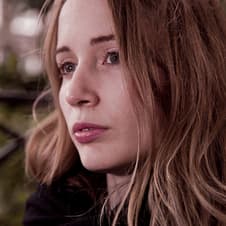


AI video models are evolving at an incredible pace, but the most significant advancements are currently occurring in video and audio generation. Just days after Kling O1 landed, Kling.ai has released Kling 2.6, a major upgrade that introduces native audio and speech capabilities.
Because Kling’s earlier non-audio models (such as 2.5) performed so well, this new audio-ready version is especially important for creators, particularly when compared to models like Google’s Veo 3.1.
With Kling 2.6 now powering Envato VideoGen, alongside Kling O1, Veo 3.1, and other leading AI video models, subscribers benefit from smoother synchronization between visuals and audio, better prompt understanding, and more coherent scene construction.
Let’s take a closer look at what Kling 2.6 brings under the hood.
What is Kling 2.6?
Kling 2.6 is the latest AI video model from Kling.ai, designed to generate short, high-resolution clips that include:
- Spoken narration
- Human-like voice layers
- Ambient audio
- Contextual sound effects
- Motion-synced timing
Instead of tacking on audio afterward, Kling 2.6 generates sound together with the visuals, making clips feel more coherent and cinematic.
What Kling 2.6 brings to VideoGen
Kling 2.6 isn’t just another model running under the hood of VideoGen. It enables Envato’s AI video generator to produce complete, synchronized clips that combine visuals, narration, sound effects, and ambience in a single pass.
1. Native audio + speech generation
Kling 2.6 can produce fully synchronized audio that aligns with visual motion.
It supports:
- Narration
- Vocal layers
- SFX and realism-driven foley
- Ambient environments
- Timing that matches character movement
This enables “one prompt → finished clip” workflows with no manual audio editing required.
2. Better handling of long, complex prompts
Kling 2.6 improves prompt parsing across:
- Multi-event scenes
- Detailed character actions
- Complex environmental descriptions
- Narrative-style inputs
You can achieve more accurate and consistent results without having to endlessly simplify prompts.
Why Kling 2.6 matters
Kling 2.6 represents a significant leap forward for creators, delivering faster content creation, richer storytelling, and polished results without the need to juggle additional tools. With full audio and speech generation, high-quality video output, stronger prompt comprehension, and a true “one-prompt → finished clip” workflow, it streamlines production in a way that feels genuinely transformative. Want to see it in action? Check out VideoGen and try it for yourself.
Kling 2.6 FAQs
What is Kling 2.6?
Kling 2.6 is the latest AI video model from Kling.ai, generating 5-second, 1080p videos with synchronized audio and speech. It supports text-to-video, image-to-video, sound effects, ambient audio, and spoken narration, all in a single generation.
How is Kling 2.6 different from Kling 2.5?
Kling 2.5 offered high-quality video but no audio.
Kling 2.6 adds:
- Full audio + speech support
- Better prompt comprehension
- Improved timing sync between visuals and sound
- More consistent multi-layer audio
This makes 2.6 far more useful for creators wanting complete “finished” clips straight from VideoGen.
Is Kling 2.6 better than Veo 3.1?
It depends on your needs:
- Kling 2.6 excels at syncing visuals and audio, and performs particularly well with longer prompts.
- Veo 3.1 excels at extremely polished outputs.
Both are available under the hood within VideoGen. With one subscription, you benefit from many AI video models, alongside the broadest range of creative assets and a full AI tool stack.
Can Kling 2.6 generate real spoken narration?
Yes. Kling 2.6 can generate speech directly inside the video when “audio” or “speech” mode is selected. It produces:
- Human-like voices
- Scene-appropriate delivery
- Lip-synced or motion-synced audio cues
This limits the need for separate voiceover tools.
Does Kling 2.6 support sound effects and ambience?
Yes. Kling 2.6 supports multiple layers of sound, including:
- Human voice
- Ambient background noise
- Motion-triggered sound effects
- Environmental elements like wind, traffic, or room tone
This results in videos that feel more cinematic and believable.
Does Kling 2.6 support landscape and portrait video?
Yes. You can generate both landscape (16:9) and portrait (9:16) videos at full HD resolution.
This is ideal for both YouTube-style content and vertical platforms, such as TikTok, Instagram Reels, and Shorts.
Can I use Kling 2.6 for image-to-video?
Absolutely. Kling 2.6 supports full image-to-video generation, allowing you to:
- Animate characters
- Add motion to product photos
- Turn concept art into moving clips
- Prototype scenes quickly
This feature becomes even more powerful with audio enabled.
Do I need to generate audio? Can I turn it off?
In VideoGen, you can choose whether or not to generate audio with your AI video.
How long are the videos generated by Kling 2.6?
Kling 2.6 currently generates 5-second videos, the standard length for audio-enabled models at this stage. With VideoGen, you can extend your generations to create longer sequences.
Is Kling 2.6 included with an Envato subscription?
Yes. Kling 2.6 is available in VideoGen as part of the Envato subscription; no additional tools or fees needed. This gives you access to a premium audio-capable model without premium pricing.
What kinds of videos can Kling 2.6 create well?
Kling 2.6 is strong at:
- Realistic human motion
- Voice-synced scenes
- Product demos
- Sports commentary
- Documentary-style narration
- Ambient or atmospheric scenes
- Creative cinematic shots
Because it supports audio layers, it’s ideal for complete short-form video storytelling.


